You can check your Bihar Police FIR status and download a copy for free at scrb.bihar.gov.in — search by complainant’s name, FIR number, or accused’s name; no login needed. If that site is slow or you’ve seen a different Bihar Police link elsewhere, that’s likely one of the other Bihar Police portals — we’ll clear that up below too.
Table of Contents
Quick Facts
| Detail | Info |
|---|---|
| Runs FIR Search & Copy | State Crime Records Bureau (SCRB), Bihar Police |
| Login Required? | No |
| Search Methods | Complainant’s Name, FIR Number, or Accused’s Name |
| Police Helpline | 100 |
| Emergency | 112 |
| Cyber Crime | 1930 |
| Heinous Crime Tip Line | 14432 |
| Women Helpline | 1091 |
| Women Helpline (for domestic abuse) | 181 |
Which Official Site Do I Actually Need?
- scrb.bihar.gov.in — run by the State Crime Records Bureau. This is where you actually search for an FIR and download a copy. If your goal is “find my FIR,” start here.
- citizenservicesportal.bihar.gov.in — a newer, alternate portal (part of Bihar’s CCTNS citizen services) that offers the same FIR search alongside other services like reporting missing persons or lost documents. If scrb.bihar.gov.in is slow or down, this is a legitimate fallback, not a duplicate scam.
- police.bihar.gov.in — the main Bihar Police website. This is for general information: helpline numbers, DGP’s office, recruitment/vacancy notices, and news. It doesn’t do FIR search itself.
In short: FIR search → scrb.bihar.gov.in (or the citizen portal as a backup). Everything else about Bihar Police → police.bihar.gov.in.
How to Check Bihar Police FIR Status
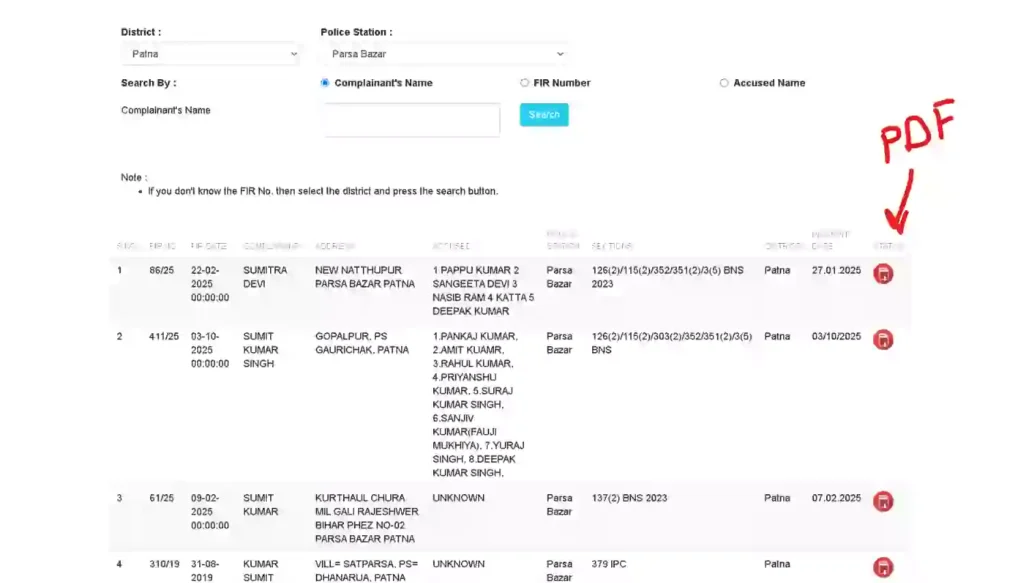
- Go to FIR Status Portal page
- Select your district and police station — this is required, as Bihar’s FIR records are organized station-wise.
- Choose your search method: Complainant’s Name, FIR Number, or Accused’s Name.
- Fill in the detail you have and click Search.
- Your FIR record — status, filing date, and current stage, including FIR download PDF— appears on screen.
If nothing shows up, double-check the police station selection first — this is the most common reason a real FIR doesn’t appear, since the record only exists under the exact station where it was filed.
How to Download Your FIR Copy (PDF)
Once your FIR appears in the search result (as guided and shown in the image above):
- Click the View/PDF icon next to your FIR.
- When it opens, use your browser’s Download or Print → Save as PDF option.
- Keep both a digital and printed copy — many banks, courts, and insurance claims ask for the FIR copy as supporting proof.
Searching FIR copy by Name Instead of FIR Number
Don’t have your FIR number handy? You don’t need it. The Complainant’s Name and Accused’s Name search options exist exactly for this — enter the name as it was recorded (spelling matters here, since the system does an exact-ish match), select the district and station, and search normally. If you’re not sure of the exact spelling used at filing time, try common variations before assuming the record doesn’t exist.
Can’t Find It Online? Here’s the Backup Option
Online search only works if the FIR has actually been digitized and uploaded — older FIRs, or ones from smaller stations, don’t always show up immediately. If your search comes up empty:
- Visit the police station where the FIR was originally filed, in person, and request a certified copy directly.
- You can also try the citizen services portal (citizenservicesportal.bihar.gov.in) as a second lookup, since it’s occasionally more current than scrb.bihar.gov.in for certain districts.
- For anything urgent tied to a court case, the eCourts case-status portal (hcservices.ecourts.gov.in) can pull up case status directly by FIR number, independent of the police record.
Bihar Police Helpline & Emergency Numbers
| Purpose | Number |
|---|---|
| Police Helpline | 100 |
| Emergency (Police/Fire/Ambulance) | 112 |
| Cyber Crime | 1930 |
| Heinous Crimes (murder, rape) — anonymous tip line | 14432 |
| Women Helpline | 1091 |
| Women Helpline (for domestic abuse) | 181 |
The 14432 line specifically exists so people can share information about serious crimes anonymously — calls are monitored by the state’s Special Task Force, and identity is kept confidential. It’s not for general FIR queries; use 100 for that.
Important Links (Official Only)
| Service | Direct Link |
|---|---|
| Search FIR / Status check (SCRB) | Check Status Here |
| FIR Copy Download | Download FIR Copy |
| Alternate FIR Search Portal | FIR Search Portal |
| SCRB Official Site | scrb.bihar.gov.in |
| Bihar Police (general site, helpline, DGP info) | police.bihar.gov.in |
| Court Case Status by FIR Number | hcservices.ecourts.gov.in |
| Cyber Crime Complaint | cybercrime.gov.in |
Frequently Asked Questions (FAQs)
How can I view my FIR online in Bihar?
Go to scrb.bihar.gov.in, click Information → Search FIR, select your district and police station, then search by name, FIR number, or accused’s name.
How do I check FIR status by name?
Use the “Complainant’s Name” or “Accused’s Name” option in the Search FIR tool on scrb.bihar.gov.in — no FIR number is needed.
Is scrb.bihar.gov.in the same as police.bihar.gov.in?
No. scrb.bihar.gov.in runs FIR search and copy download. police.bihar.gov.in is the general Bihar Police site for helpline numbers, DGP info, and recruitment — it doesn’t handle FIR search itself.
What if my FIR doesn’t show up in the online search?
It may not be digitized yet, especially for older records. Try the citizen services portal as a second option, or visit the police station directly for a certified copy.
Can I download an FIR copy without visiting the police station?
Yes — once found through Search FIR, click View/PDF and download it directly, no station visit needed.
What is the Bihar Police helpline number?
100 for general police assistance, 112 for emergencies, 1930 for cybercrime, and 14432 specifically for anonymous tips on heinous crimes.
Visit homepage for latest updates, contact for any correction or suggestion and Bihar page for related posts of Bihar.
Conclusion
For FIR search, status, and copy download, go straight to scrb.bihar.gov.in — that’s the site actually built for it, not police.bihar.gov.in. Search by name if you don’t have the FIR number, and if nothing turns up online, the police station itself or the citizen services portal are solid backups.
Disclaimer: This guide is compiled from official Bihar Police and SCRB sources for reader awareness. Hind Yojna is an independent platform and not affiliated with the Government of Bihar or Bihar Police. Processes and links may change — always verify current details on the official portals.

The founder and author of Hind Yojna. He researches and writes easy-to-understand articles on Central and State Government schemes, public services, official documents, and citizen welfare programs. His focus is on providing accurate, up-to-date, and reliable information from official government sources to help readers access government services with confidence.