You can check and pay your North Bihar Electricity (NBPDCL) bill online at nbpdcl.co.in using your Consumer Account (CA) Number — no login required for a quick payment. It serves 21 districts of North Bihar; if you’re not sure whether you’re an NBPDCL or SBPDCL customer, the district list below will settle it in a few seconds.
Table of Contents
Quick Facts
| Detail | Info |
|---|---|
| NBPDCL Full Form | North Bihar Power Distribution Company Limited |
| Formed | 1 November 2012, successor to Bihar State Electricity Board |
| Districts Covered | 21 (see list below) |
| Consumer ID Needed | CA Number (Consumer Account Number) |
| Login Required for Basic Bill Pay? | No |
| Complaint Number | 1912 |
| Customer Care | 1800-202-2813 |
| Head Office | Vidyut Bhawan, Bailey Road, Patna 800001 |
📍 Get More Updates from Hind Yojna
Are You an NBPDCL or SBPDCL Customer?
This trips up a lot of people, and honestly, even some search results blur the two together — so let’s be precise. Bihar’s electricity distribution was split into two separate companies in 2012, both formed on the exact same day:
- NBPDCL (North Bihar) covers: West Champaran, East Champaran, Sitamarhi, Sheohar, Muzaffarpur, Vaishali, Saran, Siwan, Gopalganj, Madhubani, Darbhanga, Samastipur, Begusarai, Khagaria, Saharsa, Supaul, Madhepura, Araria, Katihar, Purnia, and Kishanganj — 21 districts.
- SBPDCL (South Bihar) covers the remaining 17 districts, including Patna, Gaya, Bhagalpur, and Nalanda.
If your district is in the North Bihar Electricity list above, everything on this page applies to you. If not, you’re an SBPDCL customer and need sbpdcl.co.in instead — different company, different billing system entirely, even though both share the same parent history and a very similar-looking website design.
How to Pay Your NBPDCL Bill Online
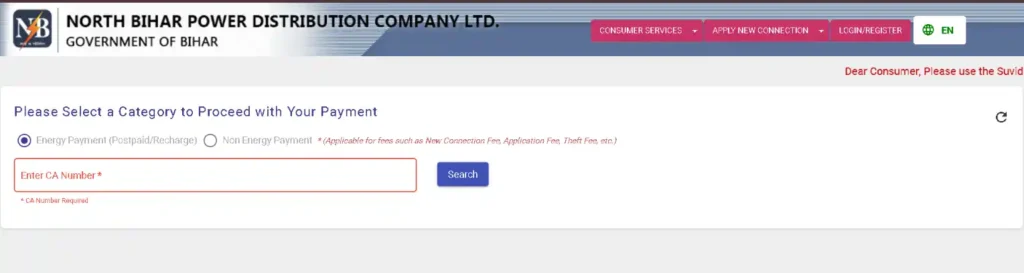
- Go to the North Bihar Electricity Bill Payment page.
- Enter your CA Number (Consumer Account Number) – Printed on the last bill.
- Hit Search.
- Your current bill details will load — amount due, billing period, due date.
- Choose your payment method (UPI, card, net banking) and complete the payment.
- Download Bill (PDF) and save the confirmation/transaction ID shown at the end for future payment dispute.
This quick-pay flow doesn’t require creating an account. If you want saved payment history, bill downloads, and account management instead, that’s what the WSS portal below is for.
How to Download North Bihar Electricity Bill
Once you search and view your bill using your CA Number on the Bill Payment page, you will see:
- View bill – Click on view bill with payment details and transaction ID.
- Download Bill – Here you can download/print your bill in PDF format.
Checking Your Bill Without Paying (WSS Portal)
If you just want to view your bill, download a past bill, or check consumption history without immediately paying, use the WSS (Web Self Service) portal at wss.nbpdcl.co.in — this is a separate, account-based system from the quick-pay page above. You’ll need to register once with your CA Number and mobile number; after that, it holds your full billing and payment history in one place.
Which NBPDCL App Do You Actually Need?
This is genuinely confusing because there are several apps, and most of them are for different, specific purposes:
- SUVIDHA (The Most Popular)— the main, general-purpose app for all Bihar electricity consumers (both North Bihar and South Bihar Electricity). Use this for bill payment, new connection applications, and general account management. This is the one most people actually need.
- Bihar Saral Smart Meter App — a North Bihar Power Distribution Company Limited- specific app, but only for smart meter consumers in rural Darbhanga, Madhubani, Saharsa, Khagaria, and Begusarai.
- Bihar Vidyut Smart Meter App — another North Bihar Electricity-specific app, but only for rural Purnea, Kishanganj, Katihar, Saharsa, Madhepura, and Araria.
If you’re not a smart-meter customer in one of those specific rural areas, skip both district-specific apps and just use SUVIDHA — it covers everything the average consumer needs.
How to Apply for a New Connection
New LT (domestic/low-tension) and HT (commercial/high-tension) connection applications are handled through the official site’s New Connection section or through the SUVIDHA app. You’ll need identity proof, address proof, and property ownership or rental documentation for the connection address. Processing time varies by division, so track your application status using the reference number generated at submission rather than assuming a fixed timeline.
| Service | Link |
|---|---|
| Apply for New Connection (LT) | New Connection (LT) |
| Apply for New Connection (HT) | New Connection (HT) |
| Check New Connection Status | New Connection Status |
NBPDCL Helpline Numbers
| Purpose | Number |
|---|---|
| Complaint Registration (24×7) | 1912 |
| Customer Care | 1800-202-2813 |
| Head Office Address | Vidyut Bhawan, Bailey Road, Patna 800001 |
A quick honesty note: a couple of other toll-free numbers occasionally show up in search results (1800-3456-198 among them) attached to third-party listings rather than NBPDCL’s own contact page. The numbers above are the ones confirmed directly on the official contact page — if a number you find elsewhere doesn’t connect, try these first.
Important Links (Official Only)
| Service | Direct Link |
|---|---|
| Quick Bill Payment/ Recharge | Pay Bill |
| WSS Self-Service Portal (account login) | WWS Portal Login |
| Apply for New Connection (LT) | New Connection (LT) |
| Apply for New Connection (HT) | New Connection (HT) |
| Check New Connection Status | New Connection Status |
| Update Existing Mobile Number | Update Mobile Number |
| File a Complaint/ Contact | File Complaint |
| Official Website | nbpdcl.co.in |
Frequently Asked Questions (FAQs)
How do I check my NBPDCL bill online?
Go to the Quick Bill Payment page on nbpdcl.co.in and enter your CA Number — your current bill shows instantly, no login needed.
Is NBPDCL the same as SBPDCL?
No. They’re separate companies covering different regions — NBPDCL serves 21 districts of North Bihar, SBPDCL serves 17 districts of South Bihar including Patna. Check the district list above to confirm which one applies to you.
Which app should I download for NBPDCL bill payment?
SUVIDHA, for general bill payment and account management. The other NBPDCL apps (Bihar Saral, Bihar Vidyut) are only for smart-meter consumers in specific rural districts.
What is my CA Number and where do I find it?
CA Number stands for Consumer Account Number — it’s printed on your last physical or downloaded NBPDCL bill.
बिजली बिल कैसे चेक करें?
nbpdcl.co.in पर जाकर अपना CA Number डालें — आपका करंट बिल तुरंत दिख जाएगा, लॉगिन की जरूरत नहीं है।
What is the NBPDCL complaint number?
1912, available 24×7 for power supply complaints.
Do I need to register to pay my bill?
No — basic bill payment only needs your CA Number. Registration is only required if you want to use the WSS self-service portal for saved history.
Conclusion
Confirm you’re actually an NBPDCL customer using the district list above; use nbpdcl.co.in’s Quick Bill Payment for a fast no-login payment, and reach for the WSS portal only if you want saved account history. For most people, SUVIDHA is the only app you’ll ever need — the smart-meter apps are for a narrow rural subset of consumers, not everyone.
Disclaimer: This guide is compiled from NBPDCL’s official website and verified public sources for reader awareness. Hind Yojna is an independent platform and not affiliated with NBPDCL or the Government of Bihar. Processes, numbers, and links may change — always verify current details on the official portal.

The founder and author of Hind Yojna. He researches and writes easy-to-understand articles on Central and State Government schemes, public services, official documents, and citizen welfare programs. His focus is on providing accurate, up-to-date, and reliable information from official government sources to help readers access government services with confidence.