You can check and pay your APDCL bill online in under 3 minutes on the official portal, or through the myBijulee app — no visit to the office needed. This guide covers bill check, payment, smart meter recharge, balance check, bill download, and the official app, in the exact order most users need them.
Table of Contents
Important Links (Official) — All in One Place
| Service | Direct Link |
|---|---|
| Pay APDCL Bill Online | Pay Bill |
| Check / View Bill | View Bill |
| Smart Meter Recharge | Recharge Now |
| Check Prepaid Balance | Check Balance |
| Apply for New Connection | New Connection |
| Customer Care / Complaint | Contact APDCL |
| APDCL Official Website | apdcl.org |
| myBijulee App (Official) | myBijulee Google Play |
Quick Facts
| Detail | Info |
|---|---|
| APDCL Full Form | Assam Power Distribution Company Limited |
| Head Office Address | Assam Power Distribution Company Limited, 5th Floor, Bijulee Bhawan, Paltanabazar, Guwahati – 781001. |
| Official App | myBijulee (Android & iOS) |
| Login Required for Bill Check? | No — Consumer ID + mobile number only |
| Payment Modes | UPI, Debit/Credit Card, Net Banking |
| Customer Care (within Assam) | 1912 (Toll-Free, 24×7) |
| Customer Care (outside Assam) | 0361-3126201 / 0361-2803200 |
| WhatsApp Support | 7575999666 |
| E-mail Support | [email protected] |
What You Need Before Online Bill Payment
- Your Consumer ID / CA Number
- Registered Mobile Number
- E-mail ID (Optional but recommended)
📍 Get More Updates from Hind Yojna
How to Check & Pay APDCL Bill Online
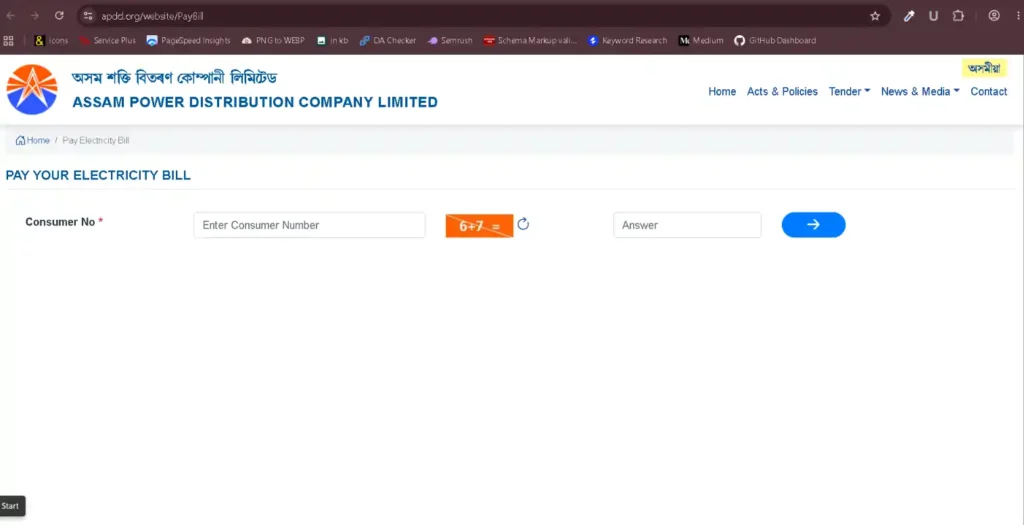
- Go to official bill payment page.
- Enter your Consumer ID.
- Enter your mobile number and email (optional).
- Enter the captcha shown and click Proceed.
- Your pending bill(s) appear with month, due date, and payable amount — select the one you want to pay.
- Confirm the payable amount (any e-payment rebate is already applied).
- Choose UPI / Debit Card / Credit Card / Net Banking, accept the terms, and click Make Payment.
- Complete payment on your bank/UPI screen and save the transaction ID.
- A receipt is sent to your mobile and email automatically.
How to Check Your Balance (With Consumer Number)
If you’re on a prepaid smart meter, checking your balance is a separate step from paying a postpaid bill:
- Go to Check Balance.
- Enter your Consumer Number / Meter Number.
- Your current balance and last recharge date display instantly — no login or OTP needed for this step.
This is different from “View Bill” — balance check is for prepaid smart meters, View Bill is for postpaid monthly billing. If you’re not sure which one you have, check the top of your last bill; it will say Prepaid or Postpaid.
How to Recharge Your Prepaid Smart Meter
- Go to Recharge Smart Meter.
- Enter your Consumer ID / Meter Number.
- Enter the recharge amount and pay via UPI/card/net banking.
- Balance updates within a few minutes — confirm using the balance check page above.
Tip: Recharge before your balance hits zero. Most smart meters cut supply automatically at ₹0, and restoration after recharge isn’t always instant.
How to Download Your Electricity Bill PDF
- Visit View Bill.
- Enter your Consumer ID and mobile number, verify with captcha/OTP.
- Once the bill loads, click Download/Print to save it as a PDF.
Works for past paid bills too — useful for address proof or tax records.
myBijulee App: Check Bill & Recharge From Your Phone
myBijulee is Assam Power’s own official mobile app (available on Android and iOS) — it does everything the website does, but built for mobile:
- View current and past bills, download PDF
- Pay postpaid bills
- Recharge prepaid/smart meters and view balance
- View payment and recharge history
- Update your registered mobile number
Note from real user reviews: the app has had reported issues with balance updates lagging after recharge and occasional crashes during payment. If a recharge doesn’t reflect within a few minutes, don’t recharge again immediately — check your balance again after 15-20 minutes, or verify on the website balance check page instead of retrying blind.
How to Apply for a New Connection
- Go to Apply New Connection.
- Register with your mobile number, select New Connection.
- Fill in address, load requirement (kW), and connection type (domestic/commercial).
- Upload required documents.
- Pay the applicable security deposit/processing fee online.
- Track status using the reference number generated after submission.
Documents required: Identity proof (Aadhaar/Voter ID/Passport), address proof of the premises, passport-size photo, ownership/rent proof.
APDCL Customer Care Number & Complaint
| Channel | Details |
|---|---|
| Toll-Free (within Assam) | 1912 — 24×7 |
| Outside Assam | 0361-3126201 / 0361-2803200 |
| 7575999666 | |
| [email protected] | |
| Online Complaint Form | File Complaint |
Keep your Consumer Number and subdivision name ready when you call or email — Assam Power uses this to route your complaint correctly. Use this channel for power outages, wrong billing, or meter faults — payment-specific issues (amount deducted but bill not updated) usually resolve on their own within 24 hours without needing a call.
Frequently Asked Questions (FAQs)
How can I check my APDCL bill online without registering?
Go to the View Bill page, enter your Consumer ID and mobile number — your current bill shows instantly, no account creation needed.
How do I check my APDCL balance with just my consumer number?
Use the Check Balance page — enter your Consumer Number, and your prepaid balance shows without any OTP.
Is myBijulee the official APDCL app?
Yes, myBijulee is APDCL’s official app for bill payment, prepaid recharge, and complaint logging.
What is the APDCL customer care number?
1912 (toll-free, within Assam, 24×7) or 0361-3126201 / 0361-2803200 from outside Assam.
Can I pay my APDCL bill using UPI?
Yes — UPI, debit/credit cards, and net banking are all supported on the official payment page.
What if my smart meter recharge doesn’t reflect immediately?
Wait 15-20 minutes and check again on the balance check page before attempting another recharge — this is a known delay, not usually a failed transaction.
Conclusion
Whether you check your bill on the website, recharge through myBijulee, or need to reach customer care, everything covered here comes directly from APDCL’s official channels. Keep your Consumer ID handy, and use the important table links above (at the top) to go straight to what you need next time — no need to search again.
Disclaimer: This guide is compiled from APDCL’s official portal (apdcl.org) and official app listings for public awareness. Hind Yojna is an independent platform and not affiliated with APDCL or the Government of Assam. Processes and links may change — always complete transactions on the official site or app and verify current details before applying.

The founder and author of Hind Yojna. He researches and writes easy-to-understand articles on Central and State Government schemes, public services, official documents, and citizen welfare programs. His focus is on providing accurate, up-to-date, and reliable information from official government sources to help readers access government services with confidence.