If you are searching for “APSPDCL bill payment”, here’s the quick guide to paying your bill through the official website and payment partners like BillDesk, and we’ll explain exactly how it fits in below, along with every other way to pay, check, or download your electricity bill.
Table of Contents
Quick Facts
| Details | Info |
|---|---|
| APSPDCL Full Form | Andhra Pradesh Southern Power Distribution Company Limited |
| Head Office Address | SOUTHERN POWER DISTRIBUTION COMPANY OF A.P. 19-13-65/A, Srinivasapuram Tiruchanoor Road Tirupati, Andhra Pradesh – 517503. |
| Official App | Southern Power (Android) APSPDCL Consumers (iOS) |
| Unique ID Needed | 13-digit Service Number (printed on your bill) |
| Official Payment Partners | BillDesk, APOnline, Paytm |
| Payment Modes | UPI, Debit/Credit Card, Net Banking |
| Customer Care | 1912 (Toll-Free, 24×7), 1800-425-155-333 |
| WhatsApp Support | 9133331912 |
| E-mail Support | [email protected] |
📍 Get More Updates from Hind Yojna
How to Pay APSPDCL Bill – APSPDCL Bill Payment
Before you start, find your 13-digit Service Number — it’s printed near the top of your last bill. Unlike some other state electricity boards, APSPDCL asks for this Service Number rather than a “Consumer ID.”
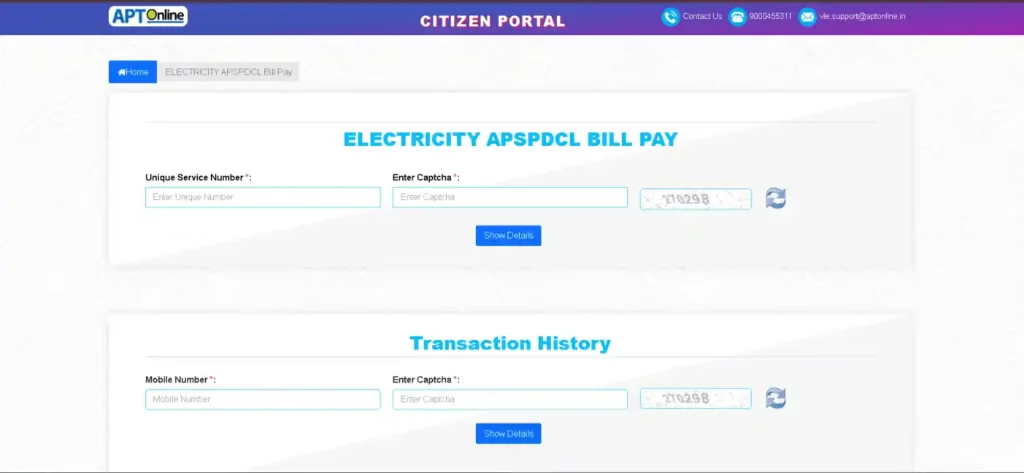
- Go to Bill Payment Page.
- Enter Service Number.
- Fill Captcha.
- Click on Show details.
- Confirm details and Submit.
- Select Payment method, and Pay.
- Complete the payment and save the confirmation/transaction ID that appears at the end.
How to Pay Bill Through APSPDCL BillDesk
BillDesk isn’t a separate company trying to collect your electricity payment — it’s the payment processor APSPDCL itself uses, the same way a shop might use Razorpay or PayU behind the scenes to actually process your card or UPI payment.
Steps — If you land on BillDesk directly, it’s the same flow — Service Number, captcha, confirm, pay — just starting from a different screen
APOnline and Paytm work the same way to complete the same payment.
Alternatively, you can use your WhatsApp for Paying Bill by texting to official APSPDCL. Always check for the verified Blue Tick before trusting the account.
How to Check Your Current Bill
If you just want to see what you owe without paying immediately:
- Go to View Bill page.
- Enter your Service Number and captcha.
- Your current bill amount, billing period, due date, and any pending dues from previous months will show up.
If you’re an HT (High Tension) consumer — commercial or industrial connections rather than home use — it has a separate HT bill view page; the standard consumer flow above is built for regular LT (Low Tension) domestic connections.
How to Download Your Bill & Check Transaction History
For Bill/Transaction history (past months, not just the current one), the Consumer Dashboard section on official site keeps a running record tied to your Service Number.
- Go to Transaction History Page.
- Enter Service Number.
- Fill Captcha.
- Click on Show details.
- Download PDF as per the choice of your month.
How to Apply for a New Connection
Andhra Pradesh Southern Power offers separate application paths depending on what you need:
- New Connection (LT) — standard domestic/residential
- New Connection (HT) — commercial/industrial
- Agricultural Connection — for farm-related power needs
New Connection Apply Links:
New Connection Registration for Low Tension (LT) – below 201HP/150KW
- Go to New Connection Registration (LT).
- Fill personal details of consumer.
- Verify mobile number with OTP.
- Fill connection address.
- Select connection type and load.
- Fill Bank and other details carefully.
- Upload Documents – ID Proof, ownership document, and passport size photo.
- Click on Registration Button.
New Connection Registration for High Tension (HT) – Above 70KVA
- Go to New Connection Registration (HT).
- Fill personal details of consumer.
- Verify mobile number with OTP.
- Fill connection address.
- Select connection type and load.
- Fill Bank and other details carefully.
- Upload Documents – ID Proof, ownership document, and passport size photo.
- Click on Registration Button.
New Connection Registration for Raithu Nestham (Agricultural)
- Go to Raithu Nestham Connection for Agriculture.
- Fill personal details of consumer.
- Verify mobile number with OTP.
- Fill connection address.
- Fill communication address.
- Select connection type, purpose and load.
- Fill Bank and other details carefully.
- Upload Documents – APWALTA certificate issued by MRO copy, Pattadhar passbook copy, Aadhaar, 1st page of Passbook Copy, DBT Mandate form copy.
- Click on Registration Button.
APSPDCL Mobile App: Two Names, One Purpose
Official app goes by different names depending on your phone.
- Android: search “Southern Power” on the Play Store
- iOS: search “APSPDCL Consumers” on the App Store
Both do the same job — checking your bill, paying it, and reaching customer support from your phone instead of the browser.
Do You Need to “Login” to Pay Your Bill?
Not necessarily. Basic bill payment (Service Number + captcha) doesn’t require creating an account. The Consumer Dashboard login is a separate, optional layer — mainly useful if you want a saved history of your payments and bills in one place instead of looking them up fresh with your Service Number each time. If you’re just here to pay this month’s bill and move on, you can skip login entirely.
APSPDCL Customer Care & Complaint Numbers
| Channel | Details |
|---|---|
| Toll-Free (Power Supply Complaints, 24×7) | 1912 |
| Customer Support | 1800-425-155-333 |
| 9133331912 | |
| [email protected] |
Use 1912 for power outages, voltage issues, or a faulty meter. For billing-specific confusion — like a payment that didn’t reflect — contact the customer support line or email.
APSPDCL Important Links (Official) — All in One Place
| Service | Direct Link |
|---|---|
| Pay Bill (APT Online Portal) | Pay Bill |
| View Bill | View bill |
| Billdesk Payment Gateway | payments.billdesk.com |
| APT Online Payment Portal | aptonline.in |
| Transaction History | Check Transaction History |
| Apply for New Connection | New Connection |
| Complaint Registration | Register complaints |
| Consumer Service Form | Register Service Request |
| Contact Details | Contact Here |
| Official Website | apspdcl.in |
| Android App (Southern Power) | Download Google Play App |
Frequently Asked Questions (FAQs)
Is APSPDCL BillDesk the same as the official website?
No — BillDesk is a separate payment processor that Andhra Pradesh Southern Power officially uses to handle the actual transaction.
How do I download my APSPDCL bill?
Look up your bill using your Service Number on the official site’s “Know Your Bill” section, then use the download/print option once it loads.
Do I need to create a login to pay my APSPDCL bill?
No, basic payment only needs your 13-digit Service Number and a captcha. Login is only needed if you want saved payment history through the Consumer Dashboard.
What’s the difference between the Android and iOS APSPDCL app?
Same functionality, different names — “Southern Power” on Android, “APSPDCL Consumers” on iOS.
What is the APSPDCL customer care number?
1912 for power supply complaints (24×7), or 1800-425-155-333 for general customer support.
Why does my APSPDCL BillDesk payment session say “invalid”?
This usually just means the session expired. Go back to the official site and start the payment fresh rather than reusing an old tab or bookmarked BillDesk link.
How to convert a Single Phase connection to a Three Phase connection?
Contact to the nearest customer service center(CSC), or call toll Free number to get information.
What is the procedure for installing a Sub Meter?
A sub meter installation can be done through private licensed electrical contractor.
What if I receive a wrong statement or bills?
For LT – Along with your present reading and payment receipt, report to the Section Officer of the area.
For HT – Report the same to the concerned Senior Accounts Officer of the circle and Divisional Engineer.
Conclusion
Whether you check your bill on the website, pay bill through Billdesk Payment, apply for a new connection or need to reach customer care, everything covered here comes directly from APSPDCL’s official channels. Keep your Service Number handy, and use the important table links above (at the top) to go straight to what you need next time.
Disclaimer: This guide is compiled from APSPDCL’s official website and verified public sources for reader awareness. Hind Yojna is an independent platform and not affiliated with Andhra Pradesh Southern Power, BillDesk, or the Government of Andhra Pradesh. Payment portals and processes may change — always initiate payments from the official website.

The founder and author of Hind Yojna. He researches and writes easy-to-understand articles on Central and State Government schemes, public services, official documents, and citizen welfare programs. His focus is on providing accurate, up-to-date, and reliable information from official government sources to help readers access government services with confidence.